Advanced Hyip Investment Scheme With Automatic Withdraw

Advanced Hyip Investment Scheme With Automatic Withdraw– is an Advanced Investment System that is mainly used for the Hyip Investment Website. It is a highly secure and fast dynamic Hyip Investment Script. In the system user can register to the application and can deposit to the account and can Invest in any of the Investment Plans which is called Schema in the system. Users can get the Signup Bonus for registering to the website and they also can earn to referral. It has various referral levels to get the referral bonus. There is an integrated automatic payment gateway like Paypal, Stripe, Mollie, Coinbase, Paystack, VogurePay, Coingate, and Flutterwave. Also, it has an automatic withdrawal method to withdraw the money to the user account directly. It has a manual deposit method available. There is a Ranking system on the website, users can achieve any of the rankings to earn from investment and can unlock ranking badges. One user can transfer the fund to other users. There is an investment and deposit bounty available. All the systems and features are managed by the admin.
Stripe Demo Card: 4242424242424242
Expiry Date: Any date in the future, CVV: 123
Admin Features
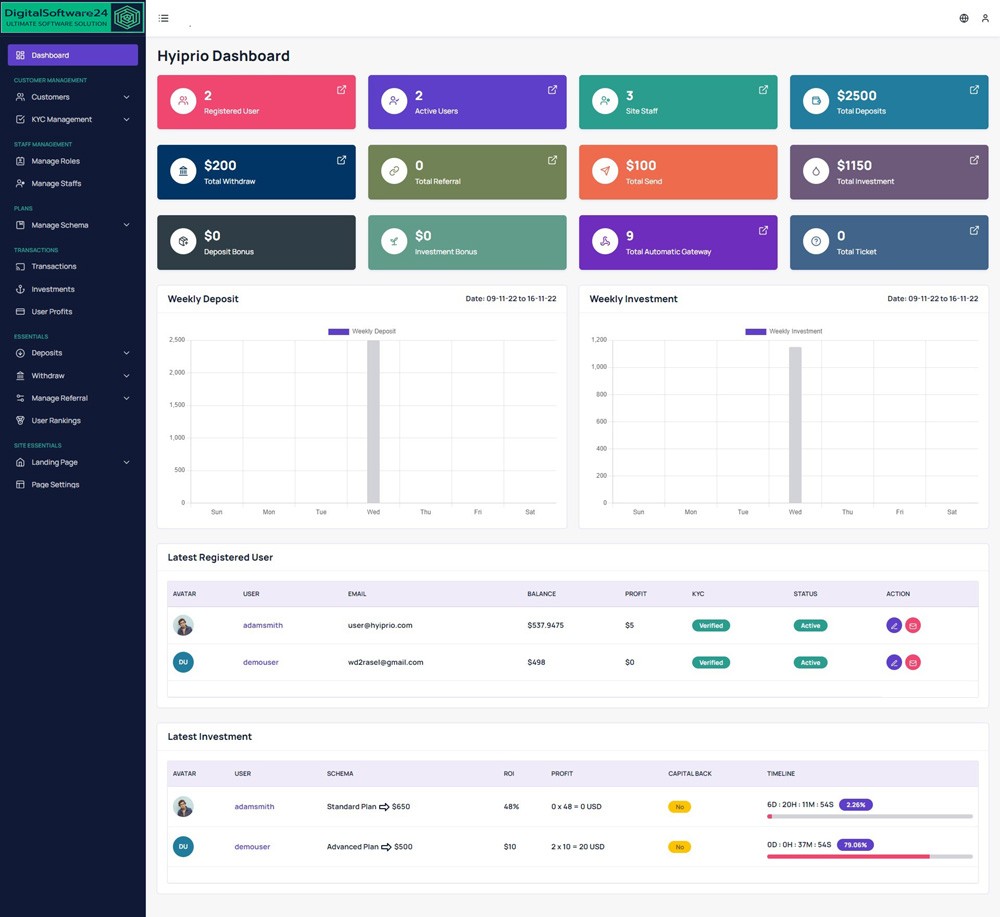
Dashboard
In the Dashboard menu, If there is a Manual deposit, Pending Withdraw request,
and Pending KYCs then Admin can see this after logging into the admin panel.
They are immediate tasks to complete first. Then admin can see the cards of all
the basic data of the website. Also can see the statistics for the Last 7 Days
of Deposits and Investments. Can explore Recently Registered users and Latest
Investments.
Customers
In the Customers menu, there are all the registered users can be found, There
are other Active users, Disabled Users, and the admin can send all the users
any message immediately. Admin can edit any of the customer details to find his
activities. Admin can add or subtract balance from any user. Admin can change
all the performing statuses.
KYC Management
Admin can set the KYC form and check and review each of the user’s KYC.
Notifications
Admin can see all the notifications here.
Manage Roles and Manage Staffs
In the Manage Roles menus, the admin can add any of the roles to the
application and can assign any of the permissions to that role. And in the
Manage Staffs menu admin can add new staff and can assign any of the roles to
the staff with his permission.
Manage Schema
Schema is the Investment Plan or Package. In the Schedule menu, the admin can
set the New Schedule on using an hourly basis. And in the Manage Schema menu
admin can add a new Investment plan or edit any of the existing Schemas.
Transactions
All the Transactions can be explored in this menu.
Investments
All Investments can be monitored from this menu.
User Profits
User All Profits can be explored in this menu.
Automatic Gateways
Admin can see the automatic payment gateways for deposit and withdrawal. He can
set multiple currencies in a single gateway supported. Multiple
currency-supported gateways are available.
Deposits
In the Deposit menu, the admin can edit any of the automatic deposit methods.
Also, can set the Manual Deposit methods and review any of the manual deposit
requests. Also can explore the deposit histories.
Automatic and Manual Withdraws
Admin can set for user automatic withdraw and manual withdraw methods.
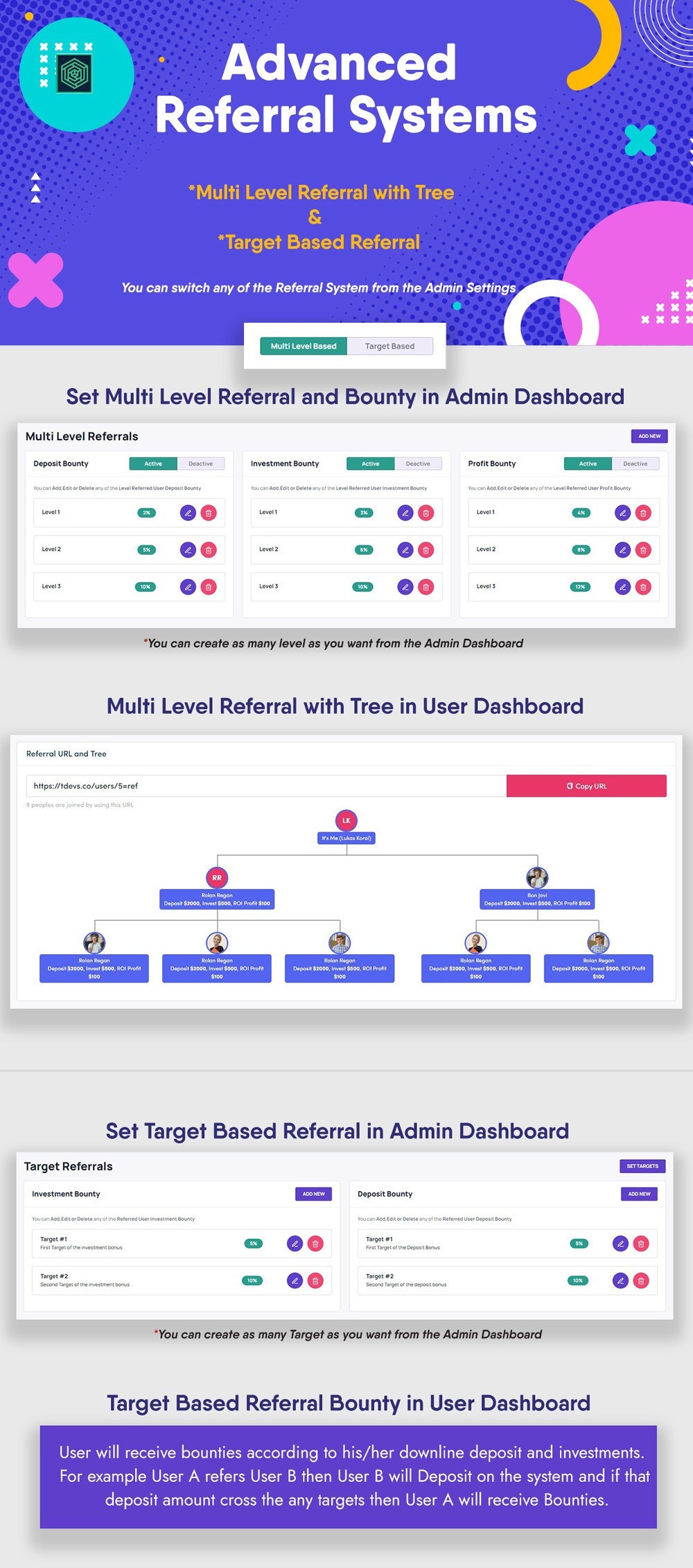
Manage Referral
Admin can set the Referral Targets and can assign those Targets to the Deposit
and Investment Bounties. Every Investment and Deposit Bounty can set the Targets,
Amounts, and Percentages to earn the users. When the user full fills any of the
targets he gets the bonus according to the percentage.
User Rankings
Admin Can set the Rankings Levels with the Badge system. Once the user reaches
the amount to earn using the profit wallet the user will unlock the Badge and
get a bonus. The bonus amount will be set by the admin.
Landing Page
All the home page sections can be managed by the admin here.
Page Settings
Page Breadcrumb image will be updated from here.
Pages
All the page’s contents and can add a new custom page from this menu by admin.
Site Navigation
All the site Navigation and Footer Navigation can be handled from this menu.
Footer Contents
All the Footer Contents can be handled from this menu.
Settings
In the Site Settings menu Global, Permission, Site Fee, Limit and Bonus, Site
Maintenance, and GDPR settings can be handled by the admin. In the email
settings, the admin can set the mail configurations. Plugin Settings admin can
manage Tawk Chat, Google reCaptcha, and Google Analytics.
Language Settings
In the Language Settings, the admin can set any of the Language.
Email Template
There are Email templates to send emails to the user for their activities.
Theme Management
There are multiple themes, any one admin can active and run. Also, there is an
option to upload an HTML theme to run the HTML template on as a website landing
page or other pages.
All Subscribers
Admin can see all the subscribers and send the message to them from here.
Support Tickets
Admin can explore all the Support Tickets from this menu.
Custom CSS
Admin can add custom CSS code from this menu.
Clear Caches
Admin can Clear Caches to click this menu.
Application Details
In this menu, the admin can explore the full Application Details
User Features
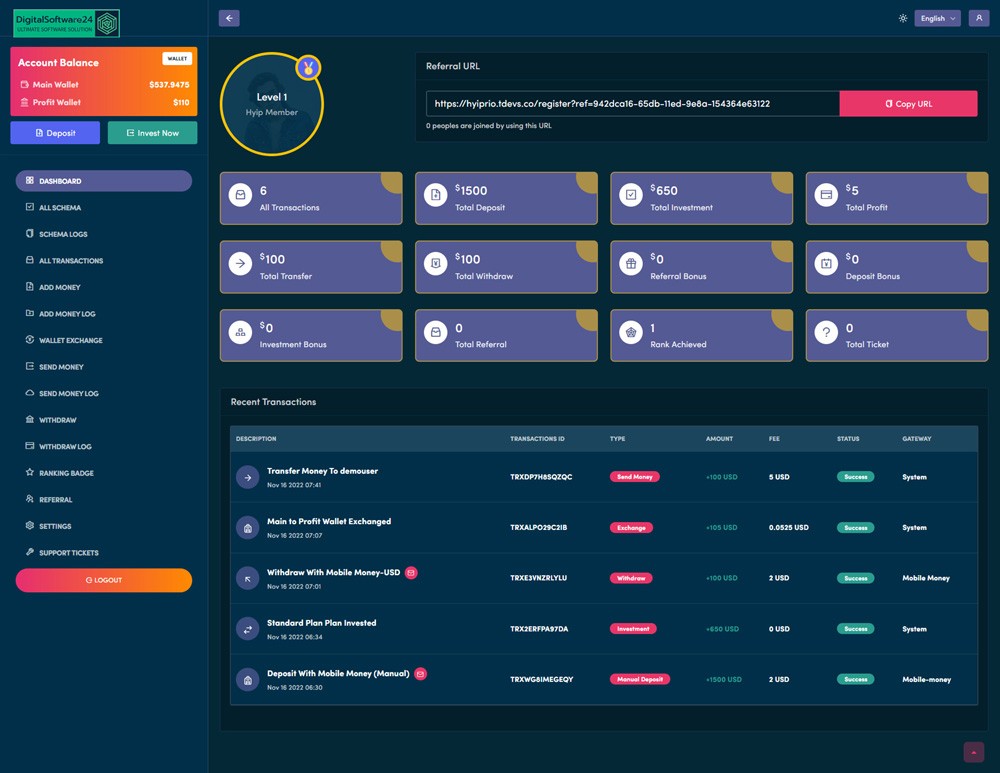
Dashboard
In the dashboard sidebar, there are two wallets one is the Main, and the amount
one is the profit wallet. There the user can see the KYC submission bar to
submit the KYC if the user does not submit the KYC before. On this page, users
can also see the Ranking Level with Badge and Referral Links. Also, users can
explore statistics and Recent Transactions.
All Schemas
Users can explore all the investment plans here and can invest in any of the
plans.
Schemas Logs
There are All Invested plans to show.
All Transactions
User All Transactions will show there.
Add Money
Users can deposit from here using any automatic or manual deposit method.
All Deposit Log
User can explore all the deposit history here
Wallet Exchange
Users can exchange any amount from one wallet for another.
Send Money
Users can transfer the fund to another user.
Send Money Log
Users can see the Send Money Log here.
Withdraw Money
User need to add Withdraw account first then can request a Withdraw. Once a request is created the admin need to review the request and send money to the user manually.
Withdraw log
Users can explore all the Withdraw history here
Ranking Badge
The user can see which badge he achieves. The badge will unlock once he
achieved and got the bonus.
Referral
All the user Referral details will show here. The referral target bonus will
show here.
Settings
On the settings page, the user can edit and update all the profile settings
here.
Support Tickets
Users can create a support ticket from here and can communicate with the admin
directly.
Key Features:
- Customer Management
- Support Ticket
- KYC Management
- User & Admin Notifications
- Login as User
- Staff Management
- Role Management
- Advanced Plan Management
- Invested Plan Cancellation
- Plan Off Day system
- Landing Page
- Fully Responsive
- Dark and Light Mode
- User Profit
- Automatic Gateways
- Automatic and Manual Deposit
- Automatic & Manual Withdraw
- Crypto and Fiat Currency
- 2FA Verification
- Multi-Level Referral with Tree
- Target Based Referral
- User Rankings System
- Admin URL changeable
- User Ranking System
- Rankings Badge
- User Fund Transfer
- Signup Bonus
- Referral Bonus
- Rankings Bonus
- Main and Profit Wallets
- Fund Add and Subtract all the Wallets
- Wallet Exchange
- Landing Page Management
- Pages Management
- Home page redirection
- SMS Settings
- Page Management
- Pages SEO
- Site Navigation
- Site Footer
- Custom Site Currency
- Notification with tone
- Theme Management
- Dynamic Landing Theme
- Site Maintenance Mode
- GDPR Settings
- Language Settings
- Tawk Chat
- Google reCaptcha
- Google Analytics
- Email Newsletter
- Custom CSS
- Clear Caches
- Application Details
System Requirements:
- Laravel >=9.3
- PHP >= 8.1
- MySQL 5.7+
Icons:
- Font Awesome Icon
- Lucid Icons
- Flaticon
- Ant Icon
Photo Credit:
- Freepik
- Pexels
1 Reviews Found
simon650
2025-03-17 11:58 PM"They seem to prioritize safety and protection in all their solutions.











tom344 Client
2025-03-17 12:12 PMwonderful site pamyent very first
prerauer43 Client
2025-03-17 01:24 PMVery premium quality products are sold here.
louis2159 Client
2025-03-17 11:52 PMI have been using this website for a long time and I have already received many payments. Thank you Digital Software 24.
simon650 Client
2025-03-17 11:59 PMThis is a very realistic company.
abdullah3265 Client
2025-03-18 12:21 AMI am very Lucky to use this site. Thanks for digital software 24